Showing posts with label Jdeveloper. Show all posts

Tuesday, June 17, 2014

Preserve runtime customizations of webcenter portal application?

Scenario:

Let is say we have developed a webcenter application using JDeveloper and made some runtime customizations from the webcenter portal administration console. Running the application again from the Jdeveloper removes all the customizations made.


Background

All the runtime customizations made are stored in a component called MDS but not in the physical folder location of JDeveloper application. And by default on running the portal application, all the runtime customizations are deleted.

Solution

To avoid this we have to override this default behavior from the portal application properties settings by clicking the preserve customizations across application runs as shown below.


Thursday, June 12, 2014

Apply a template at runtime in Oracle webcenter portal

We might need to change the application template at runtime from the Oracle Webcenter portal administration console. This can be done as shown below

Step1: 
  1. Make sure that template is available and not hidden
  2. If not available, select a particular template and click the edit button and select "Show"  


Step2:

Choose and apply the template from the configuration tab as shown below


Friday, June 6, 2014

Get the ResourceBundle handle based on the current Locale in ADF

import java.util.ResourceBundle;
import javax.faces.context.FacesContext;
import javax.faces.component.UIViewRoot;
import java.util.Locale;

private static ResourceBundle getBundle() {
    FacesContext ctx = getFacesContext();
    UIViewRoot uiRoot = ctx.getViewRoot();
    Locale locale = uiRoot.getLocale();
    ClassLoader ldr = Thread.currentThread().getContextClassLoader();
    return ResourceBundle.getBundle(ctx.getApplication().getMessageBundle(), locale, ldr);
}

Find if a ShowDetailItem is collapsed or expanded in managed bean?

Sometimes wither in the Panel Tabbed Layout or Panel Accordion, we would like to find if the show detail item is collapsed or expanded. This can be done as below

import oracle.adf.view.rich.component.rich.layout.RichShowDetailItem;

public void onClickSDITwo(DisclosureEvent disclosureEvent) {
    RichShowDetailItem item = (RichShowDetailItem)disclosureEvent.getSource();

    if (disclosureEvent.isExpanded() == true) {
        // If the show detail item is expanded then show all its children
        item.setDisclosed(true);
    }
    else if (disclosureEvent.isExpanded() == false) {
        // If the show detail item is collapsed then hide all its children
        item.setDisclosed(false);
    }
}

Thursday, February 27, 2014

How to create and make a page style available at runtime in webcenter portal?

Page styles are JSPX pages that can be used as templates to create new pages at runtime


Step1: Create a style/jspx document based on which the user can create run time pages.

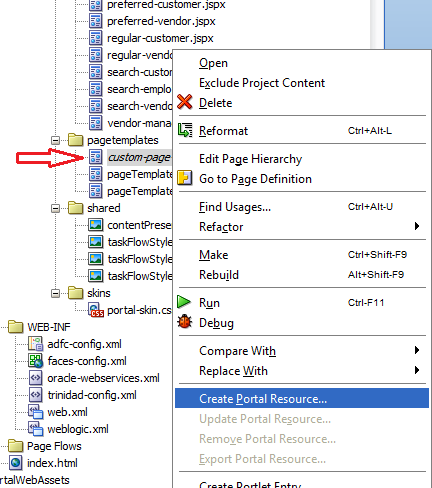
Step2: Create a portal resource of the jspx document as shown below.


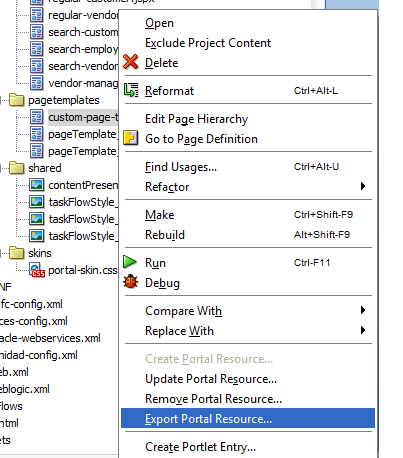
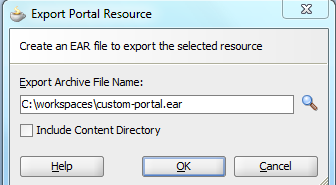
Step3: Once Done, expose that portal resource as a ear file to be uploaded later to the webcenter admin console and made available to create new pages


Step4: Login to the webcenter admin console and click the page styles. Click the upload button and upload the ear file that was exported in step 3, as shown below.


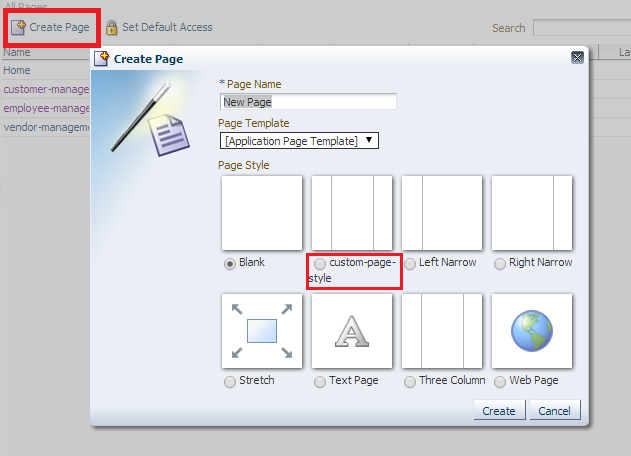
Step5: Select the page style as shown below in the page creation dialog


Friday, June 28, 2013

Implement Primary Key Population for ADF BC based on SQL server

We can auto populate the primary key attribute in many ways for an ADF BC Entity Object based on Oracle Database but for the Entity Objects generated using SQL Server the following proceedure should be used

Step 1. Create an auxiliary database table
Create an auxiliary database table that will be used to generate the primary key values as shown below.

CREATE TABLE [dbo].[S_ROW_ID](
[start_id] [numeric](38, 0) NULL,
[next_id] [numeric](38, 0) NULL,
[MAX_ID] [numeric](38, 0) NULL,
[AUX_START_ID] [numeric](38, 0) NULL,
[AUX_MAX_ID] [numeric](38, 0) NULL
)

Step 2. Create the database Connection 
ROWIDAM_DB
In your application, create a database connection named ROWIDAM_DB that points to the database containing your S_ROW_ID table.
Note: It is mandatory to use the same connection name

Step 3. Configure the Primary Key Attributes 
Set the primary key attribute value to oracle.jbo.server.uniqueid.UniqueIdHelper.getNextId() in the Entity Object as shown below


Step 4. Modify the adf-config.xml
Though we create the connection to the sql server, we need to modify the default preferences in adf-config.xml as shown below.